
Lesson 4: Decomposition & Debugging
What is decomposition?
 Decomposition - Whakamatariki
Decomposition is the ability to take a large task, problem or system and break it down into smaller parts.
If we decompose a problem, it makes it more manageable to design, test, check, and improve.
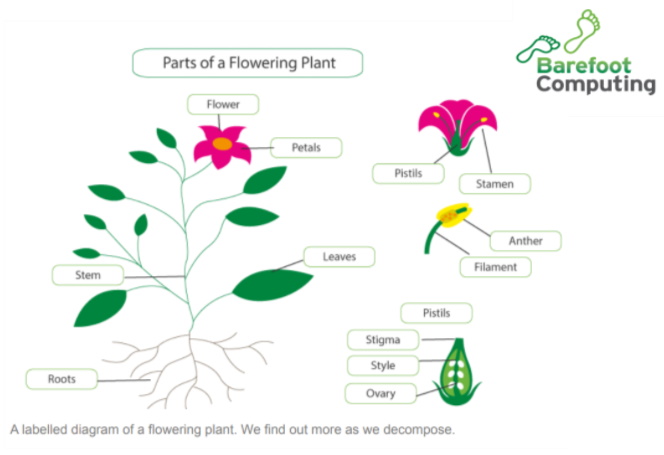
As the ‘Parts of a Flowering Plant’ diagram from Barefoot Computing shows, if we can decompose we can find out much more about the situation.
Decomposition is used in everyday life too. We naturally decompose activities that we need to do into smaller, more manageable tasks. Decomposition can breakdown a complex task, system or problem. An example is making breakfast in the morning.
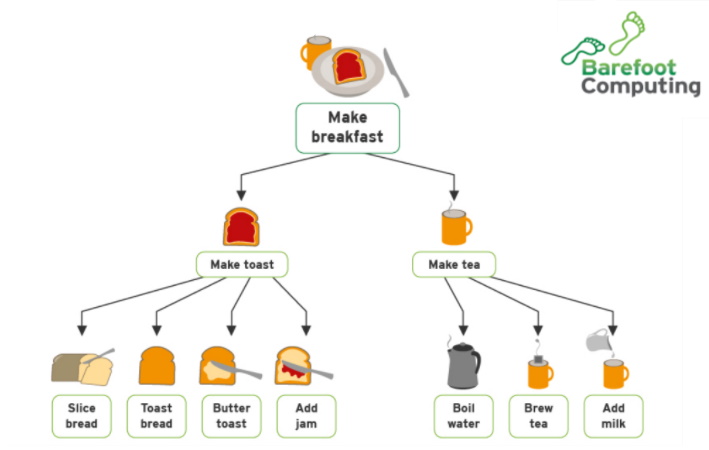
 Kōrero Mai: Can any of the sub tasks be decomposed further?
How many people could follow this process?
Are there any other activities that you do that
could be decomposed into smaller tasks?
Kōrero Mai: Can any of the sub tasks be decomposed further?
How many people could follow this process?
Are there any other activities that you do that
could be decomposed into smaller tasks?
Decomposition in Dance and Music
Watch the video of finger tutting.
 Kua reri? - Ready? It's your turn... Using decomposition to break down a task.
Can you decompose the arm tut into step by step instructions for another student to follow? Use diagrams to show the smaller tasks. Give your arm tut decomposition to another student to follow and check.
What is debugging?
Debugging - Patuiro
Did your friend spot any problems or errors with your ‘tut’ decomposition? If so, they have found ‘bugs’. A bug is an error, fault or flaw in any computer program or a hardware system. A bug produces unexpected results or causes a system to behave unexpectedly.
As a programmer you need to be able to ‘debug’ your algorithms and programs.
 i mohio koe? - did you know?
The term 'bug' to describe defaults dates from the 1870's. In fact, Thomas Edison wrote about "bugs" when he was inventing.
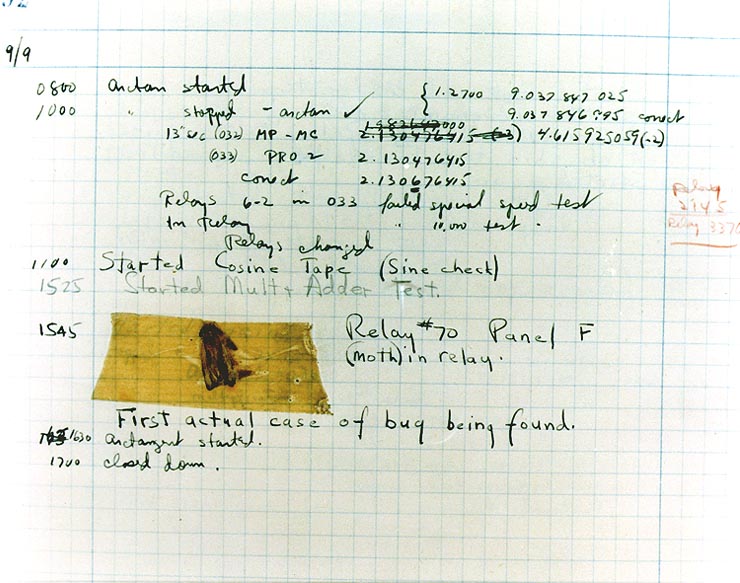
The first ever real life bug was documented as being found inside a computer in 1947.
i mohio koe? - did you know?
The term 'bug' to describe defaults dates from the 1870's. In fact, Thomas Edison wrote about "bugs" when he was inventing.
The first ever real life bug was documented as being found inside a computer in 1947.
How can I debug? Ideas to help you debug…
Methodical Approach
A methodical approach is the best way to find bugs. Working through the problem with a linear approach - one step at a time - will help to find the bugs and develop a solution
Rubber duck debugging
Talk to a rubber duck! Explain your code to the duck one line and even one symbol and syntax choice at a time. Ducks are slow to understand, so the more detail in the descriptions the better. Thinking out loud is great practice. Explaining those thoughts to someone or something else is better.
Kōrero Mai: Using Decomposition, break down the following program into smaller instructions
Analyse the following problem and by using decomposition, break it down into smaller steps. The first step could be:
Types of C# programming errors
As programming requires you to write instructions specifically, there are a number of easy mistakes that even the most experienced programmers make. Keep an eye out for:
- Most instructional lines need to end with a
;(semi-colon) - Symbols such as
<and>looks similar but are opposites (Less than vs Greater than) - The correct maths symbols being used, ie.
+,-,=or== - Spelling and correct capitalisation of letters and words
- Making sure that variables start at the correct value.
- Working inside of the curly brackets
{,}
 Kua reri? - Ready? It's your turn... Using decomposition to break down a task.
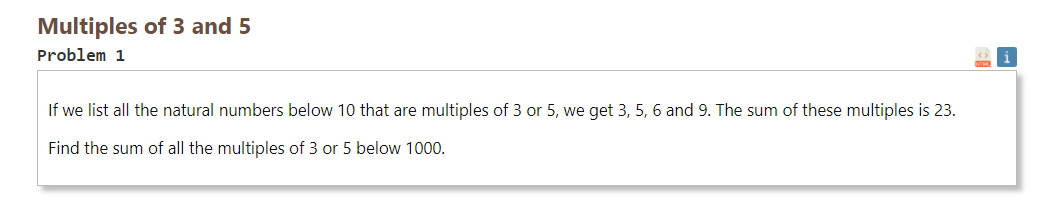
Using our knowledge of Debugging, debug the following code. The following algorithms are solutions to the previous multiples of 3 and 5 problem. Both algorithms are designed to solve the same problem.
Don't forget to bring your rubber duck!