
Lesson 3: Programs
What are algorithms?
 Kōrero Mai: What can you remember previously about algorithms?
 |
 |
 |
Computational Thinking: Programs
What is a program?
 Program - papatono
A computer program is a list of instructions that tell a computer what to do. Everything a computer does is done by using a computer program. Programs stored in the memory of a computer let the computer do one thing after another, even with breaks in between.
Do you recognise any of the following programs?
Programming languages
Programming Languages - reo papatono
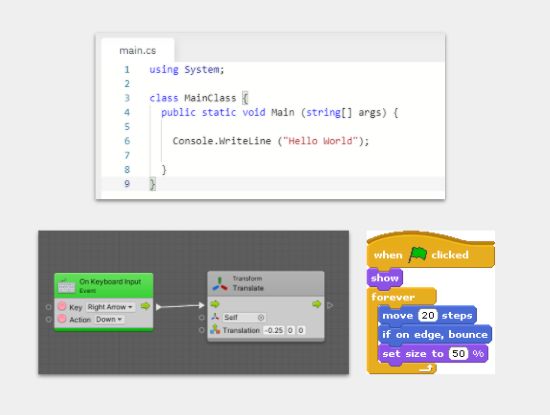
There are many different types of programming languages used to instruct a computer. They are a formal language that is used to convert an algorithm into a computer program. Here are a selection of some of those languages:
Do you recognise any of these logo’s?

Elements of programming languages
There are different elements that make up a programming language, for example:
- Syntax - the form or structure of the language, e.g. some use graphics like Bolt and Scratch and some are text based using words, numbers and punctuation like C#, Python and Javascript.
- Semantics - the meaning of language. Does the programming language typed into a computer make sense?
- Variables - how data, such as numbers, is stored by the computer which can then be used later for mathematical calculations or decision making depending on the program.
An algorithm is a set of steps or instructions that describes how to perform a task. They are ideas and can be in the form of text, images, flowcharts, pseudocode etc.They are created by humans for humans.
A program is created when we convert an algorithm into instructions for a computer to carry out. A program is executed by a computer not a human. It is written in a language that can be interpreted by a machine.
 Kua reri? - Ready? It's your turn... Turning Algorithms into Programs
Lets now try turning an Algorithm into a program. Turn the image of the Flowchart "Testing a light bulb" into a program. Lets first turn it into Pseudocode to better see the structure.
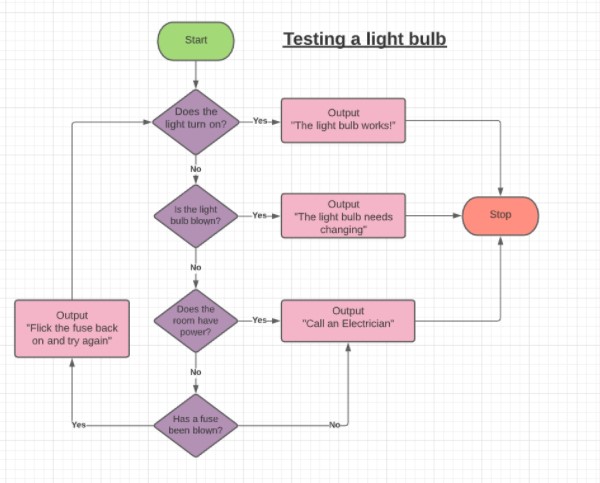
Pseudocode from a flowchart
Below is an example of one possible solution to the above flowchart
LOOP{
IF LightBulbTurnsOn = true
	OUTPUT "The Light Bulb Works!"
	EXIT
ELSE IF LightBulbIsBlown = true
	OUTPUT "The Light Bulb needs changing"
	EXIT
ELSE IF RoomHasPower = true
	OUTPUT "Call an Electrician"
	EXIT
ELSE IF FuseIsBlown = false
OUTPUT "Call an Electrician"
	EXIT
ELSE
OUTPUT "Flick the fuse back on and try again"
	CHANGE FuseIsBlown => false
Converting pseudocode into C#
Next we will look at what a C# program for this same algorithm looks like. Look for the similarities the program shares with Pseudocode and even flowcharts
using System;

class MainClass {
  public static void Main (string[] args) {
    //Starting values for our Questions / Decisions
    //Use 'true' or 'false'
    bool LightBulbTurnsOn = false;
    bool LightBulbIsBlown = true;
    bool RoomHasPower = false;
    bool FuseIsBlown = false;


    //This is the beginning of the loop
    do{
      if(LightBulbTurnsOn == true){
          Console.WriteLine ("The Light Bulb Works!");

          //We can use 'Break' To exit the loop
          break;
      }
      else if(LightBulbIsBlown == true){
          Console.WriteLine ("The Light Bulb is blown and needs replacing");

          //We can use 'Break' To exit the loop
          break;
      }
      else if ...
We can see that given the same inputs (Yes or No responses) we should achieve the same outcome as our flowchart!
 Kua reri? - Ready? It's your turn...
Try editing the code block below yourself! Try:
Kua reri? - Ready? It's your turn...
Try editing the code block below yourself! Try:
- Add in all the missing outputs to the program. Use the flowchart as a guide. C# outputs look like
Console.WriteLine("")where the output goes inside the speech marks - Changing the values at the top from
truetofalse. What happens? - Can you get all the different outputs to appear?