
Lesson 03: Error Detection and Efficient Code
 Error - Hapa
 Kōrero Mai: What is Error detection in computational thinking?
Error detection is a method that can look at some data and detect if it has been corrupted while it was stored or transmitted.
Why do you think this is important? Discuss.
What is Error correction in computational thinking?
Error correction is when the method detects an error it tries to put the data back to how it should have been.
Is this a better method than error detection? Why? Discuss.
What is Error control in computational thinking?
Error control is the general term for error correction and error detection systems.
 Kua reri? - Ready? Parity Magic Trick
Have a go yourself ...can you figure out the trick?
Head to https://csfieldguide.org.nz/en/interactives/parity/

Error correction in computational thinking. Why is it important?
A more sophisticated parity method is applied to almost all data that is stored or transmitted on computers.
If we didn’t have error detection and correction then unexpected errors in data would be common, and digital devices wouldn’t be used to store anything important.
People wouldn’t trust computers. Computers wouldn’t be reliable.
Writing efficient code
Efficiency - whāomotanga
How do we write more efficient code?
Let’s take a look at the example from the previous lesson. In this section we asked you which was the more efficient method?
We can see that the method on the right hand side looks more efficient.
But why is that?
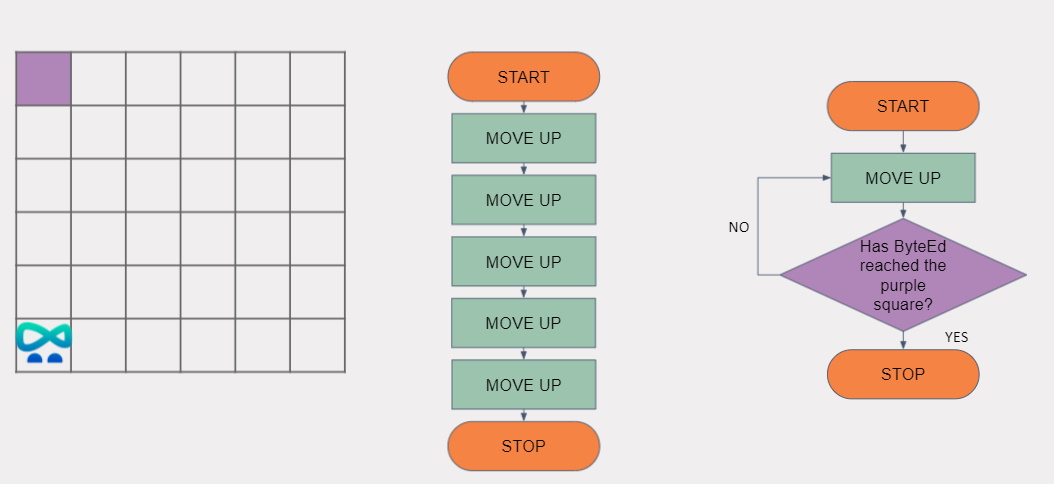
What is efficient code?
This algorithm is more efficient because it utilizes a loop to repeat repeatable instructions. This is a more efficient method as it reduces the amount of instructions in our code.
Not only does this reduce the file size of our program, but it is also a quicker way to achieve this outcome.
Loops are also efficient because you can easily change the amount of times they loops, depending on the need of your application.
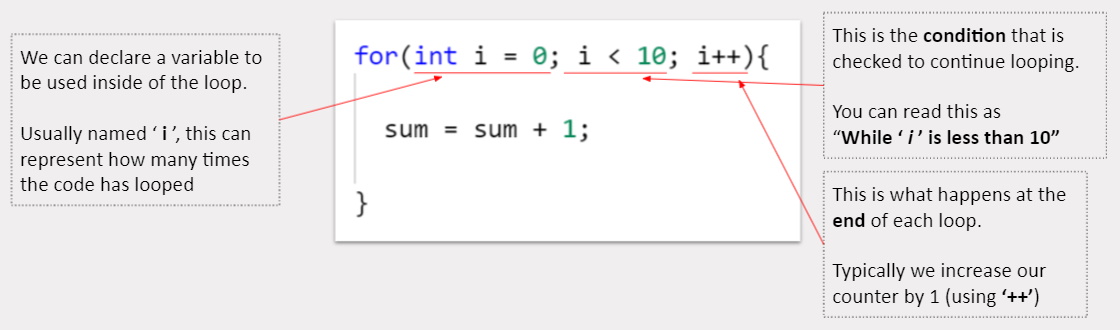
Recap - What is a For loop?
A FOR loop, like any other loop, will loop through a sequence of code until a condition is met. But what makes a for loop more efficient than others?
A FOR loop declares all the information it needs in a single, easy to read line. Here is a breakdown of how it works:
Why use a For loop?
Efficiency of code doesn’t just come down to how fast it runs, but also how easy it is to iterate and make changes.
A FOR loop gives us to access all of the critical information in a single line. Some easy to make changes would be:
- Changing the loop condition (how many times to loop)
- Changing the incrementer (change it to += 2 instead of ++)
- Change the point at which the loop starts at (2 instead of 0)
For loops in C#
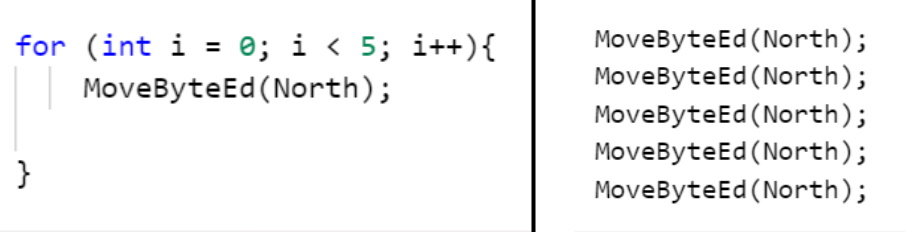
Let’s turn that algorithm to move ByteEd into a program with a FOR loop.
By using a FOR loop, we can easily specify how many times we would need to move our character up.
If we would ever need to move our character more space, we can change the number ‘5’ to ‘10’ or even ‘20’.
 Kōrero Mai: What is Efficiency Use cases for FOR loops in programs
What are some other use cases you can think of for using loops in applications? Think about applications that already exist in real life. Do they have lots of repeatable instructions?
Some potential answers could be:
Kua reri? - Ready? It's your turn... Using FOR loops to iterate through data program
The exercise below requires you to fulfill the brief by using FOR loops to iterate through a large number of information. You will need to call a method each time you loop and store information that is returned.