
Lesson 13: HCI in Virtual Reality & More complex comparison operators
 User interface - tāhono kaiwhakamahi
 Kōrero Mai: Watch the video...think about...
Human Computer Interaction (HCI)
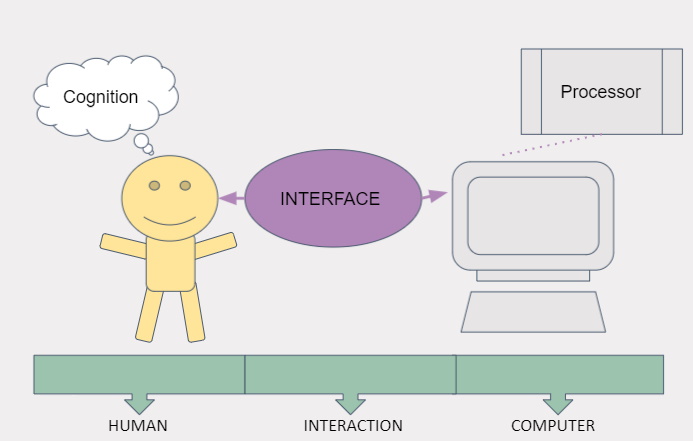
HCI is the study of how humans interact with digital interfaces, e.g. computers, phones, VR, etc.
HCI consists of three parts: the user (Human), the Computer and how they work together (Interaction).
Improvements in HCI can lead to enhanced VR
experiences by providing more natural and
efficient ways for a user (human) to interact
with a virtual environment.
Human perception
VR experience is all about understanding how humans perceive and adapt in an artificial environment and what makes them comfortable quickly.
This video demonstrates how the science of neurophysics can use VR to aid society. The research is based on perceptions.
This video demonstrates how the ability to catch a real ball changes with different VR perceptions.
Interactions in VR
VR interaction is very different from that with a phone or a laptop, here are some examples:
-
If you have a head mounted display covering your eyes then real world devices are completely blocked off. It’s pretty hard to type on a keyboard if you can’t see the keys. That means a lot of the interfaces like mouse and keyboard don’t work in VR because you can’t really use them.
-
A lot of interfaces are designed for 2D and they don’t allow you to interact with depth.
-
Virtual reality on the other hand is 3D. You’re interacting all around you in a 3D space. We need new types of interaction devices to make me VR usable.
-
Virtual reality is about transporting you to a virtual world. So the job of virtual reality interaction isn’t just to make our environment easy to use, It is about making us feel immersed in the virtual world.
Types of Illusions
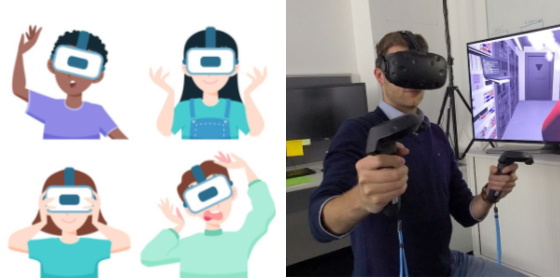
Virtual reality is all about creating the three illusions that make up presence:
-
Place illusion is the feeling that we’re in a different world. It is about your movement and your perceptions matching. It’s mostly handled by the main interactions of VR like when your head moves and your view the direction you’re looking in changes.
-
Plausibility illusion is the feeling that the world is real and that is responding to us. Things need to respond to you as they would in the real world.
-
Embodiment illusion is the feeling that we have a body in the virtual world. Feeling that you are interacting with your body rather than a mouse or game controller. It comes from having a visual representation of your body e.g. arms, but it also comes from really moving as we interact not just press buttons.
Types of Interaction : Natural interaction
-
VR headsets come with similar interaction devices (controllers). Making a user interface easy to use requires thinking about a lot of things. The actions you can do need to be discoverable. You need to be able to see what you can do in an interface easily.
-
Gestural interfaces are hard to use. This is because sometimes they are subtle and difficult to discern in a VR system. Sometimes there just isn’t a natural action in the real world, that corresponds to an intended effect in the virtual world.
This video shows a user interacting with a haptic glove. How does the glove help improve the users experience?
Types of Interaction: Magical Interaction
In VR you can do things that are not possible in the real world. You can do magic. You can have superpowers. This is what we call magical interaction. Why limit ourselves to strictly real-world interactions?
-
Magical interactions are interactions you could do in the real world if only you’re a superhero.
-
Sometimes you need magical interaction because you can’t reproduce the real world interaction in VR. For example, most mobile virtual reality doesn’t include hand tracking, so you can’t just grab something. That means you have to select something by looking at it, which is pretty magical when you think about it.
-
At other times, you want magical interaction because you don’t want to be limited by the real world.
Types of Interaction: Active and passive
Active interaction is when consciously deciding to interact with a device. If you decide to click a button on your phone and then you click it.
Passive interaction is where you are not consciously interacting a piece of technology. For example, a fitbit recording your heartbeat and steps when walking.
Virtual reality has a lot of active interactions - picking up objects, moving stuff around.
The most basic virtual reality interaction of all turning your head to look around is a passive interaction.
There are lots of other possibilities for passive interaction. For example, you might want the leaves of a tree to move as you brush past. This small response from the world can really make you feel like you’re part of it. It’s exactly that kind of little response that creates the plausibility illusion.
Comparison operators in code
Conditional - here
What comparisons can you make between two numbers?
When we compare the values of two numbers, there are comparisons we can make between them. These comparisons will either be true or false:
- Number A is greater than Number B
- Number A is less than Number B
- Number A is equal to Number B
- Number A is not equal to Number B

What data do these questions produce?
When we use these statements, we get a result that is either true or false. A Boolean. Example:
Number A is equal to Number B
or
Number A is not equal to Number B
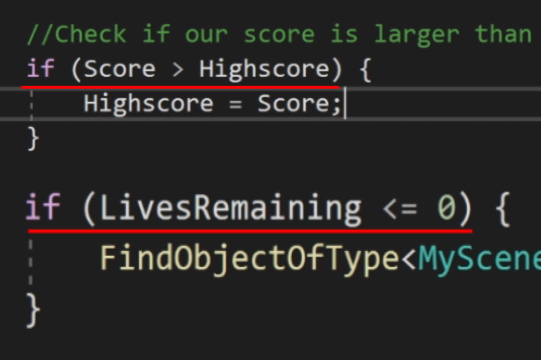
Because of this, we often use comparisons inside of IF statements to determine whether something should or shouldn’t occur.
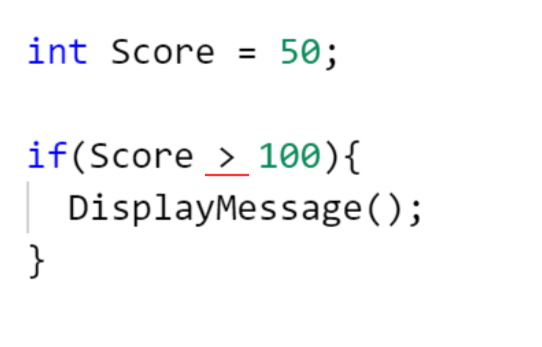
How do we write comparisons in C#?
When coding in C#, we can use the same symbols we would typically use in mathematics. When checking if two numbers are:
- Greater than or Less than each other, we use the
>and<symbols respectively. - Greater than or equal to, we use
>= - Less than or equal to, we use
<= - Equal or not equal to, we us
==and!=respectively
Kōrero Mai: What use cases can you think of for these comparisons?
There are a number of ways to use these in your code. Infact, the possibilities are limitless. It really comes down to the program you are creating. Some use cases for these would be:
 Kua reri? - Ready? It's your turn... Completing loops by using comparisons
There are a number of exercises to be completed within this exercise. Such as:
More information can be found in the included ReadMe file
Extension: What to try next?
How do you make a VR glove?
Want to know more about the haptic glove from the earlier video? Here’s how it is made and how it uses human senses to improve HCI.