
Lesson 11: Impact of VR and making code efficient
 Virtual Reality - ao mariko
 Kōrero Mai: What is VR? Where is Virtual Reality used in society?
Recapping the last lesson: Watch the Video to help and answer the points below:
What is the purpose of Virtual Reality?
Virtual reality technology is used to create immersive experiences that can help educate and even entertain consumers.
There are 3 types of VR:
- Fully immersive VR
- Semi immersive VR
- Non immersive VR
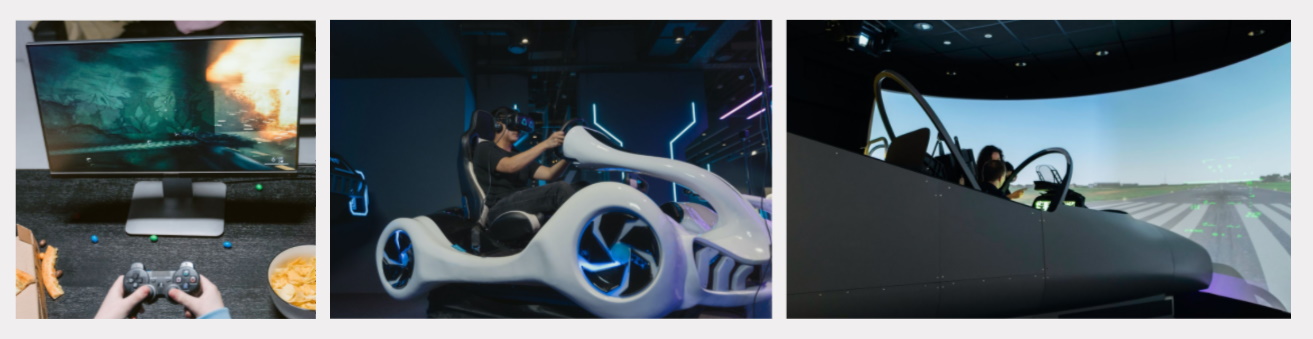
Kōrero Mai: Look at the images below:
Which type of VR do you think each one is? why?
 Kōrero Mai: What are the beneficial impacts that VR has on society and the environment?
Benefits of VR in society
VR can transport a trainee into lots different situations, places and environments for a range of training purposes. Training is more efficient as scenarios can be repeated and improved on over and over again.
VR can reduce the costs involved when training people in employment opportunities.
VR is a completely immersive, visual and sound-based experience, which can safely replicate dangerous training situations to prepare and train, without putting people at risk.
VR can be used to help medical issues where patients need help adjusting to normal life situations; this is known as Virtual Reality Exposure Therapy (VRET). Virtual reality technology can provide a safe environment for patients to come into contact with things they fear, whilst remaining in a controlled and safe environment.
VR allows for a consequence free learning environment; the risk of inflicting harm or making a mistake while practicing is eliminated.
VR can be a motivating platform to safely practice social skills for children.
Can you think of any more reasons that VR can benefit our society and our environment?
Kōrero Mai: What are the Limitations/Risks that VR has on society and the environment?
Limitation / Risk of VR in society
Some users of virtual reality games have reported a host of troubling effects, including damage to their vision, disorientation, dizziness, nausea and even seizures. This is known as cybersickness.
In addition to this, using VR carries a very real risk of injury. Players have suffered from broken bones, torn ligaments, and even electric shocks!
Research has found that there is an increase in strong negative emotions when immersed in a VR world as opposed to a computer game on a laptop.
Addiction to playing/using
Less human to human contact
Can you think of any more reasons that VR can limit or put at risk our society and our environment?
 Kua reri? - Ready? How VR can extend human possibilities?
Task: VR Research:
Efficiencies in code
Creating efficient sequences and loops
Learning to create efficient code will not only aid you in creating fast code, but creating easy to manage code for you and your team.
Let’s take a look at the examples below. At first glance, which looks more efficient?
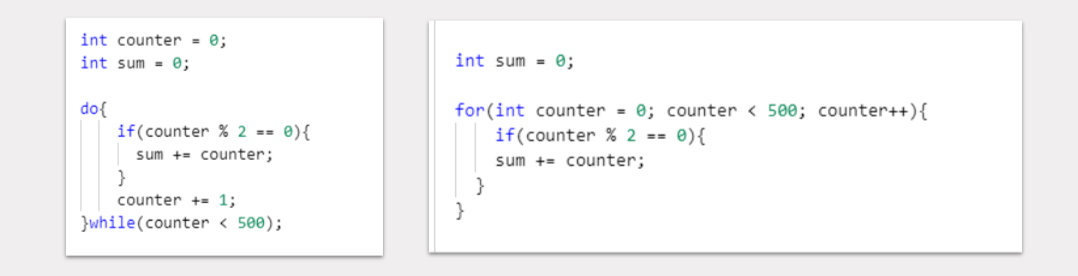
The code on the right tends to be the more efficient version in most cases. This code uses a FOR loop.
What is a For loop?
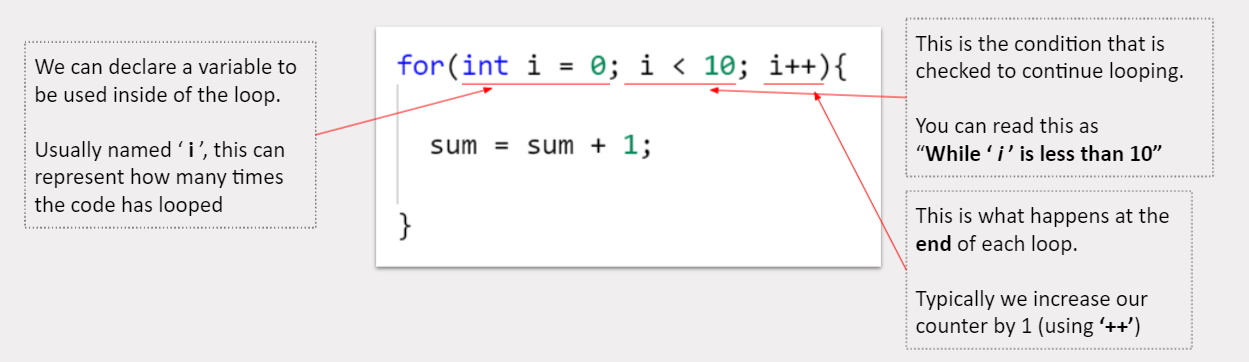
A FOR loop, like any other loop, will loop through a sequence of code until a condition is met. But what makes a FOR loop more efficient than others?
A FOR loop declares all the information it needs in a single, easy to read line. Here is a breakdown of how it works:
Why use a For loop?
Efficiency of code doesn’t just come down to how fast it runs, but also how easy it is to iterate and make changes.
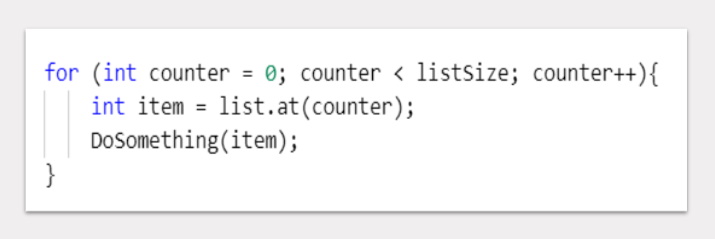
A FOR loop gives us to access all of the critical information in a single line. Some easy to make changes would be:
- Changing the loop condition (how many times to loop)
- Changing the incrementer (change it to += 2 instead of ++)
- Change the point at which the loop starts at (2 instead of 0)
Data sizes and choosing the right type
Creating efficient code can also come down to the type of data being used. Having a computer sort through large amounts of unnecessary data can slow it’s efficiency down.
Always keep an eye or for the potential of more efficient solutions to a problem.
This could be as simple as using booleans to store true or false rather than using strings to store it as “yes” or “no”
Using methods to increase efficiency
Another efficiency in code is the creation and use of methods and functions. We’ve already been using them in our exercises! Think of methods as a way to point to another section of code, before continuing in the usual top down approach.
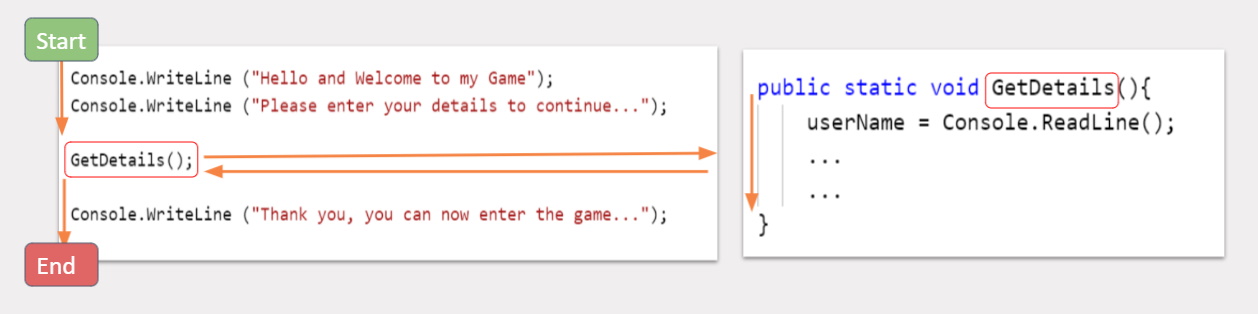
How do methods work?
As methods are a kind of algorithms, we can visualise methods using flowcharts as well.
Take a look at the example:
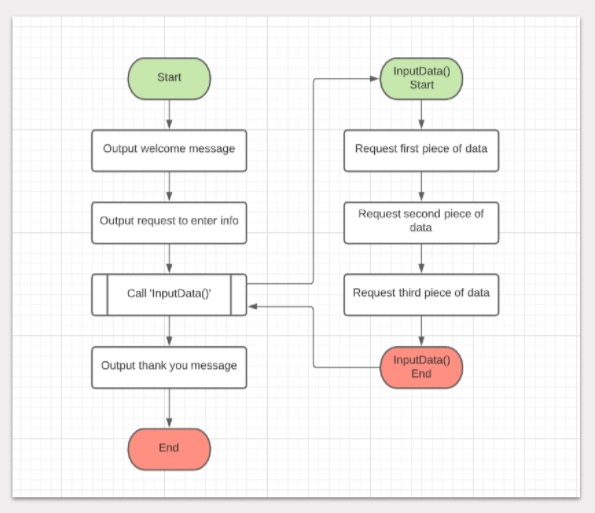
Each method can be seen as their own flowchart that runs from it’s start to end point. One method points to another.
Kōrero Mai: What are the benefits of using methods?
Methods are primarily used when code needs to be repeated multiple times. Instead of copying the same code multiple times, we can simply point to where the code is instead.
This also comes with the benefit of only needing to change code in a single place when we need to update our algorithms.
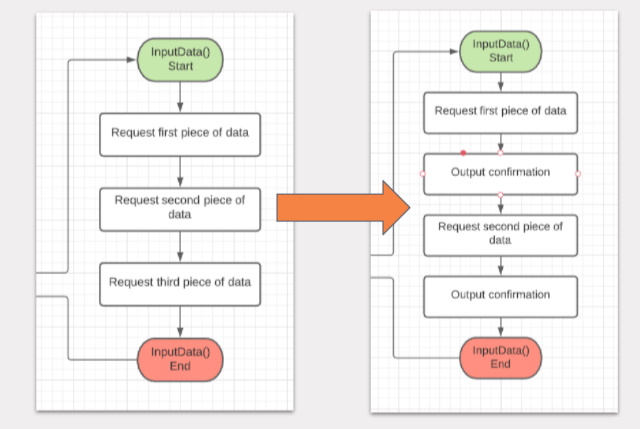 Kua reri? - Ready? Identify the repeating code and create a method
Identify the repeating code in this algorithm below and create your own version as a flowchart consisting of multiple smaller flowcharts.
1. Greet User
2. Ask them to input a username
3. Request Input
4. Store Input in variable
5. Confirm Input
6. Output Welcome Message with their username
7. Ask user their preferred genre of music
8. Request Input
9. Store Input in variable
10. Confirm Input
11. Output results with their chosen genre
12. ....
Finished? Take a look at this video to learn about Extended Reality